Backup Verification and Automated Restore Testing
Backup logs show success, not whether your data actually recovers.

A daily backup log showing green tells you data moved from one place to another. It does not tell you the data can be brought back, and that gap between "transferred" and "recoverable" is where organizations lose client relationships, six-figure sums, and sometimes the business itself. It only shows up during an actual emergency. According to research cited by deliberatedirections.com in 2026, 67% of businesses discover their backups are corrupted or incomplete only once they need to restore them for real.
This isn't a configuration mistake a better setup would catch. It's structural. A backup job log reports on the job: did the transfer start, did it finish, did the software throw an error. None of that touches whether the resulting files are intact, whether everything that needed to be captured actually was, or whether the restored system will run once it's back online. "Verified" is a different claim entirely, resting on four things a completion flag cannot see.
Media readability and file integrity come first: are the bits on disk actually the bits that were written, with no silent corruption from a bad sector or a failed write. Completeness comes second, and it's the one most teams get wrong, because a backup can catch every file in a folder and still miss the database relationships tying those files together. Application-level functionality is third: once restored, does the software actually start, let a user log in, and serve correct data. Credential and key validity is fourth. The encryption keys and access credentials used to lock the backup have to still work at restore time, and that is not guaranteed just because they worked when the backup was created.
That completeness failure is exactly what took down a marketing agency's client base, according to a case detailed by deliberatedirections.com. The backup system had been running fine by every visible measure, but it never captured the database relationships tying client records to campaign data. When restoration was needed, the files came back, but the structure connecting them didn't. Six major healthcare clients left, and the agency spent $200,000 in specialist fees trying to reconstruct what the backup was supposed to have preserved in the first place.
A separate case from the same source involves an accounting firm running two years of automated QuickBooks backups, verified only by checking whether the job reported "complete." It reported complete every time. The corruption inside those files wasn't discovered until peak tax season, the one stretch of the year when a firm has zero slack to rebuild client books from scratch.
Neither of these is a fluke or an edge case involving a careless IT department. They're the predictable output of treating job-status logs as proof of recoverability. What the current threat environment has done is turn that mistake from a costly inconvenience into something closer to an existential bet, and pretending otherwise is the wrong call.
How ransomware turned backup integrity into a survival question
Ransomware attacks now happen on a clock, not as isolated incidents. Invenio IT data cited by CrashPlan in 2026 puts the current rate at roughly one attack every 19 seconds, with a projection of one every 2 seconds by 2031. That frequency alone would strain any organization relying on backups it has never tested. Worse, attackers know exactly where the recovery leverage sits, and they go after it directly.
Veeam's 2025 Ransomware Trends Report found that backup repositories are targeted in the majority of ransomware attacks, and a significant share of those attempts succeed: a significant share of affected backup data ended up modified or deleted outright. A company with working backups doesn't need to pay, so attackers have made the backup itself the primary target rather than an afterthought.
The attack rate isn't the most dangerous part of this picture. The confidence gap underneath it is. A Globe and Mail report citing DataNumen research from May 2026 found that 69% of ransomware victims believed, before the attack, that they were adequately prepared. Nearly all of them, 98%, had a ransomware playbook on paper. Fewer than half had the technical elements that playbook depended on, including actual backup verification procedures. The plan existed. The proof it would work did not, and that distinction is where most of these companies actually lost.
A mid-sized manufacturer's experience, documented by deliberatedirections.com, shows what that gap costs in practice. Silent corruption affected every backup the company made for eight straight months. The job logs showed green the entire time. Nobody ran a restore test, so nobody found the corruption, until ransomware hit in March 2024 and the company discovered, in the middle of an active attack, that there was nothing usable to restore from. The recovery cost came to $2.3 million, a figure that dwarfs what a routine restore test would have cost across those eight months.
Immutability helps, but it answers a different question than verification does, and conflating the two is a mistake worth naming directly. Industry guidance frames immutable, tamper-resistant backups, along with at least one copy kept isolated from the network, as foundational. Broader security guidance echoes this, recommending at least one copy stored offline or otherwise out of an attacker's reach — a principle consistent with standard incident response frameworks. Both measures reduce the odds a backup gets deleted or encrypted by ransomware. Neither confirms the backup was any good to begin with. An immutable copy of a corrupted file is still a corrupted file, just one nobody can delete.
RTO, RPO, and the gap between what the business plan promises and what IT can actually deliver
Two numbers define what recovery actually means for a given system. RPO, recovery point objective, is how much data the organization can stand to lose, measured as the maximum acceptable age of the last good recovery point. RTO, recovery time objective, is how long the organization can stand to be down, measured from the moment of the incident to the moment service comes back. Together, per Veeam's 2024 guidance, they set the thresholds that turn an outage from an inconvenience into a genuine crisis, and they're also the exact numbers every restore test is supposed to check.
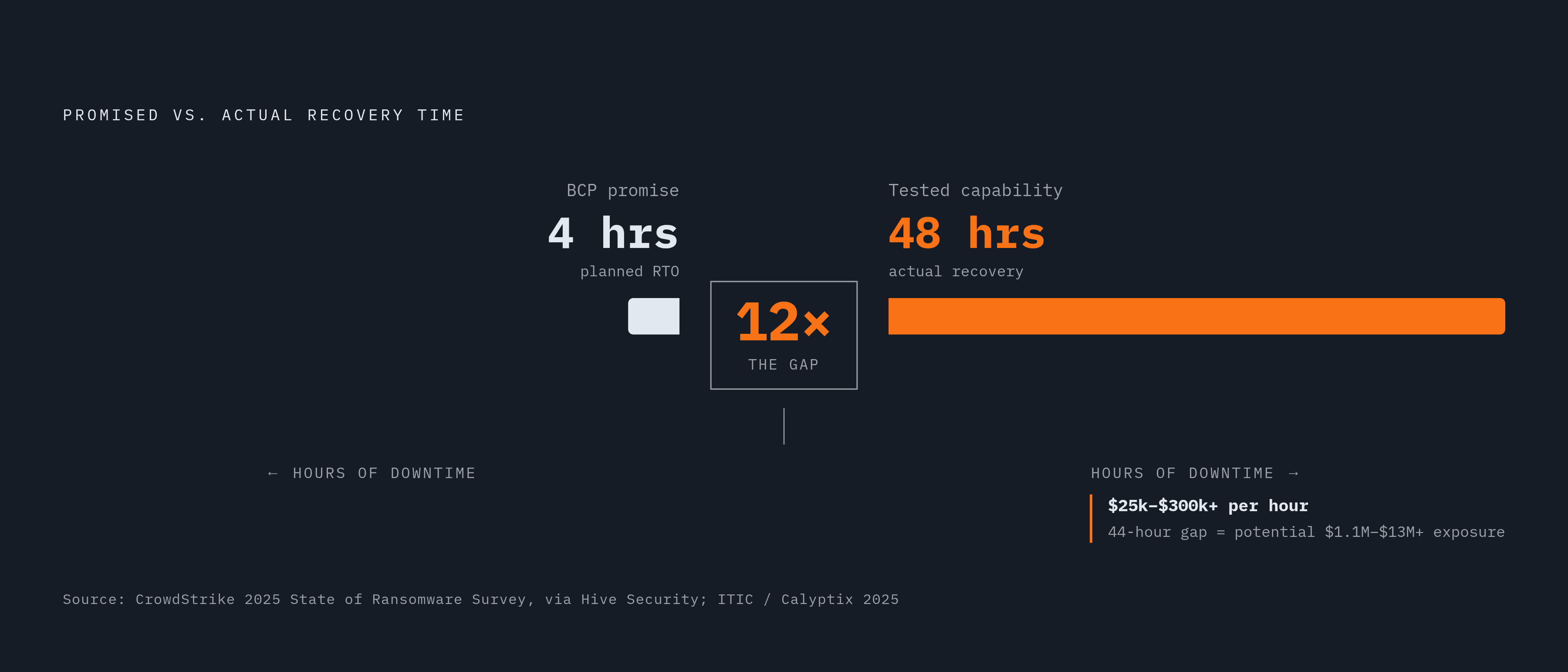
Most of these numbers come from a conference room, not a stopwatch, and that's the part worth being blunt about. A Hive Security blog post from 2025, citing CrowdStrike's 2025 State of Ransomware Survey, points to business continuity plans that promise a four-hour RTO while the organization's actual, tested recovery capability sits closer to 48 hours. That's not a rounding error. It's a twelvefold gap between what leadership has told the board and what the systems will really deliver, and it exists because RTO and RPO targets get set during planning exercises rather than measured during timed drills. Without an actual test, a target is a hope, not a fact.
Not every workload deserves the same scrutiny, and treating them all identically wastes resources on low-priority systems while under-protecting the ones that matter. Splitting by tier fixes this. Tier 1 covers mission-critical systems: the tightest RTO and RPO targets, the most frequent testing, and in some cases Continuous Data Protection (CDP) for workloads that can't tolerate more than seconds of data loss. Tier 2 covers important-but-not-critical systems, tested on a regular schedule against clearly defined pass criteria. Tier 3 covers everything else, tested less often but still tracked and documented rather than ignored.
CDP sits at the far end of the RPO spectrum, replicating every change in near real time so that almost nothing is lost between the last write and the failure. Even CDP still depends on a tested recovery procedure behind it, though. Replication without a verified restore path is just a faster way to copy data that might not come back correctly.
The dollar figures make the four-hour-versus-48-hour gap concrete rather than academic. A joint 2025 study from ITIC and Calyptix Security found that many small and mid-sized businesses lose $25,000 or more for every hour of downtime, while enterprise organizations average north of $300,000 per hour. At those rates, an RTO that's off by even a few hours turns into a bill with a lot of zeros on it.
What a complete restore test actually covers, step by step
A restore test that means anything starts before the restore itself, with scope and pass criteria defined in writing. NinjaOne's guidance for managed service providers frames this as the first and most skipped step: decide what workload is being tested, what type of restore is being run, and exactly what counts as a pass, before anyone touches the recovery tools.
Pass criteria have to be specific enough to fail. "The restore completed" is not a criterion, it's a description of what the job log already told you. Real pass criteria look like this: checksums on the restored data match the source data bit for bit, the application actually starts once the restore finishes, a test user can log in and authenticate normally, the recovered data falls inside the promised RPO window, and the time the restore took falls inside the promised RTO window.
Different restore types catch different failure modes, and a testing program that only runs one type is only checking one kind of risk. File-level restores confirm individual files are intact and complete, catching corruption at the individual file level. Application-level restores go a layer deeper, confirming a database, an ERP system, or an email platform actually starts and behaves correctly once it's back, the layer that goes untested when verification stops at file retrieval. Full image or VM restores validate an entire system stack at once. Full-site disaster recovery tests simulate a catastrophic, everything-is-gone scenario and measure whether failover and RTO hold up at real scale.
None of this should touch production. NinjaOne's guidance is blunt on this point: restore tests need to run in an isolated sandbox, on a separate network, with masked data and temporary DNS, so a test that goes wrong doesn't take down the systems it's meant to protect.
Every test, regardless of type, needs to leave behind a specific record: the date and the systems tested, the pass-or-fail result against each defined criterion, the actual recovery time achieved measured against the RTO target, any anomalies found along the way, and the corrective action taken in response. That record is what turns a test from a one-time exercise into evidence an auditor can actually use later.
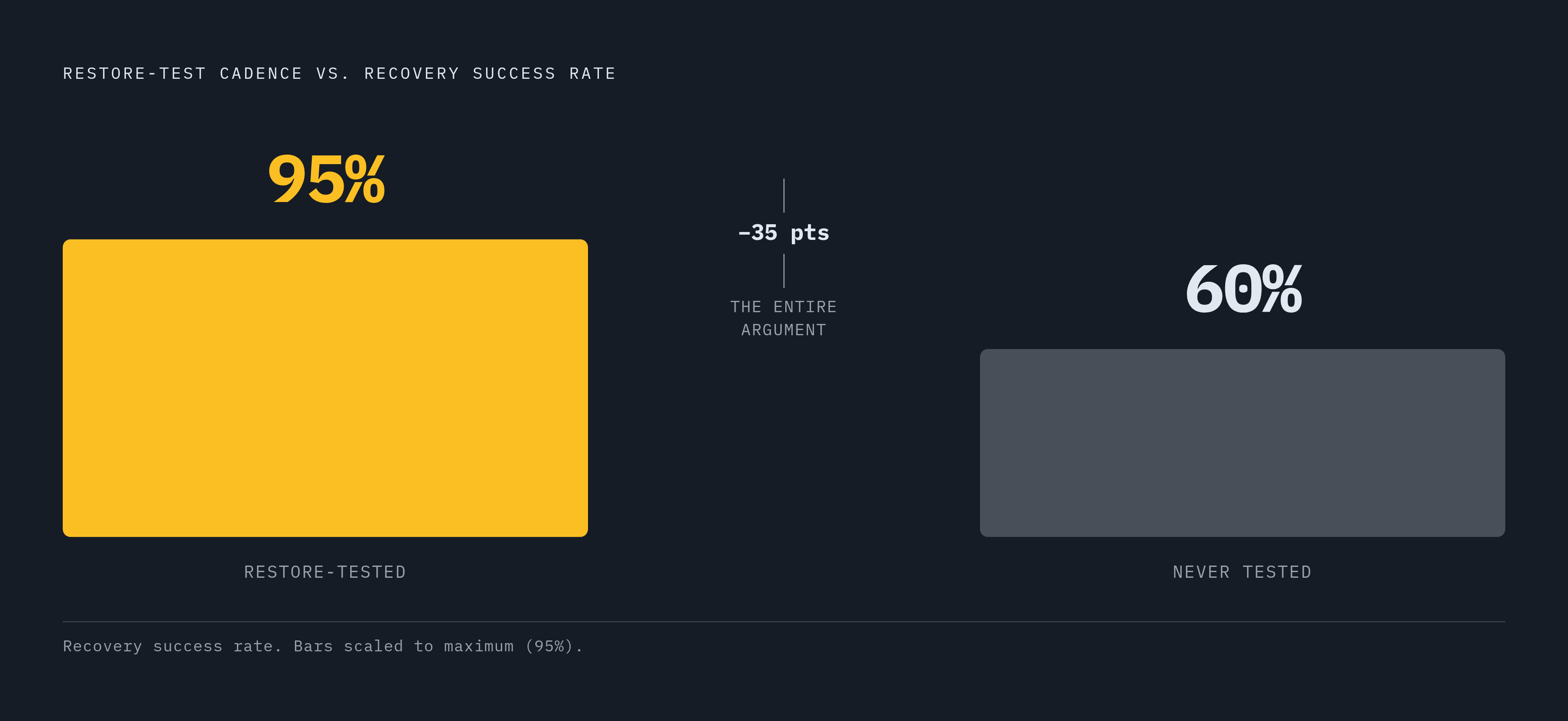
Cadence matters as much as method here, maybe more. According to deliberatedirections.com, tested backups reach a 95% recovery success rate, compared with roughly 60% for backups that have never been tested. That 35-point gap is the practical difference between a backup program that holds up under pressure and one that doesn't. Yet only around 40% of businesses test even quarterly. Quarterly manual testing beats no testing, but for Tier 1 workloads, quarterly isn't enough anymore: the field is moving toward monthly or fully automated, continuous drills, and any program still on a quarterly cycle for its most critical systems is already behind.
How automation platforms operationalize restore testing at scale
Manual quarterly testing works for a business with a handful of critical systems. It falls apart for an MSP running restore drills across dozens of clients, or an enterprise with hundreds of workloads spread across on-prem servers, VMs, and SaaS platforms. At that scale, verification has to be automated, or it simply doesn't happen consistently.
The underlying principle is the extended version of the classic 3-2-1 backup rule: 3-2-1-1-0. Three copies, two different media types, one offsite, one immutable, and zero unverified backups. That last digit is the whole argument of this piece compressed into one number: a copy that hasn't passed an automated restore verification doesn't count as a real backup, no matter how many green checkmarks its job log shows.
Amazon Web Services built this logic directly into AWS Backup Restore Testing, launched in 2023 and updated in 2025. It lets an organization define a named restore testing plan with a configurable frequency and start time, and choose whether to test specific recovery points or randomly sampled ones, with the service inferring the metadata each restore job needs. It tracks how long each restore takes and produces results formatted for compliance and governance review. Beyond basic job completion, an optional validation layer uses Lambda functions triggered by Amazon EventBridge to check network connectivity, pull actual objects back from S3, or confirm encryption key status, real data validation rather than a completion flag. Resources spun up for the test get deleted once the validation window closes, and an Audit Manager integration confirms whether the test met the restore objectives that were set for it.
Veeam Recovery Orchestrator takes a similar approach aimed at disaster recovery specifically. It runs non-disruptive failover tests that check RTO and RPO targets without touching production, and it automatically builds runbooks while capturing recovery results, approvals, and timing data for auditors. Veeam's broader Data Platform was named a Gartner Magic Quadrant Leader for the tenth consecutive year in 2026, with the highest score in Ability to Execute for the seventh consecutive year running. Worth flagging, though: Recovery Orchestrator lives only in Veeam's Premium edition. It's absent from the Foundation and Advanced tiers, so automated DR orchestration through Veeam means buying at the top of the product line, and any evaluation that skips this detail is comparing the wrong price point.
Commvault's CommServe Recovery Validation Service handles this through auto-recovery verification, periodic DR backups, and cleanroom recovery testing, with data integrity checks specifically built for VMware and Hyper-V virtual machines and support for data integrity checks across virtual machine environments.
Bacula Enterprise covers similar ground with automated recovery testing, restoration verification, recovery simulation, and workflows that can be customized per environment. It runs granular restoration tests alongside backup consistency checks, integrates with virtual machine environments, and generates automated reports along with what the vendor describes as self-healing backup verification. Its restoration verification runs without touching live production, a detail that matters for organizations that genuinely cannot afford any disruption during a testing cycle.
Whatever the platform, the things worth checking for stay consistent: scheduling controls that map to workload tiers rather than a single blanket frequency, sandbox isolation from production, evidence capture that happens automatically rather than by someone taking screenshots, and reporting built for compliance review rather than internal use only.
What compliance frameworks actually require from backup verification
Regulators have started drawing the same line this piece has been drawing all along: a backup existing is not the same claim as a backup being verified, and a green job-status log doesn't satisfy either one. Frameworks like HIPAA, PCI DSS, SOC 2, and ISO 27001 are increasingly explicit that "we have backups" is not sufficient evidence on its own.
What compliance-ready verification tends to require, across these frameworks, includes a written retention schedule rather than an ad hoc one, immutable and air-gapped backup targets, encryption applied end to end, role-based administration built on least-privilege access, restore testing documented with dated results and any corrective actions taken, and an audit trail showing exactly what was tested, when, and what happened. NIST's IR 8374r1 guidance sets a floor here: at least one backup copy kept offline or otherwise out of an attacker's reach. That's a minimum requirement, not a finished security posture on its own, and treating it as the finish line is how organizations end up compliant on paper and unrecoverable in practice.
Access control intersects with backup integrity in ways compliance frameworks are starting to formalize directly. Security best practices for backup environments consistently call for approval requirements on sensitive backup operations, mandatory multi-factor authentication, separating backup administrator roles from everyday IT administrator roles, and active monitoring for backup deletion attempts or unusual patterns of job failure. All of these reduce the chance that an attacker, or an insider, can quietly sabotage the one thing the organization would need in a crisis.
Without automation, producing audit evidence for any of this means manual logs and screenshots stitched together after the fact, and that approach tends to be inconsistent, slow to assemble, and often missing exactly the piece an auditor asks for. Platforms like Veeam Recovery Orchestrator, which automatically builds runbooks while capturing recovery results and timing data, solve this by making the documentation a byproduct of running the test rather than a separate manual task somebody has to remember to do. AWS's Audit Manager integration works the same way: a control confirms whether a given restore test met its stated objectives, and that confirmation comes out of the same workflow that ran the test, not a separate compliance exercise bolted on afterward.
Building a restore testing program that improves over time rather than checking a box
A restore test that fails is not evidence of a program falling apart. It's the program doing exactly what it's supposed to do: finding the gap on a Tuesday afternoon in a sandbox, instead of finding it during an active ransomware incident at 2 a.m. Organizations that treat a failed test as an embarrassment to bury are missing the entire point of running one, and that instinct, to hide a bad result instead of fixing it, is worse than skipping the test in the first place.
The cadence question comes back to workload tiers again. Tier 1 systems, the ones a business genuinely cannot operate without, warrant monthly or continuous automated drills, the direction most practitioners and platform vendors are already pushing toward. Tier 2 systems can run on a quarterly cycle with documented results each time. Tier 3 systems need less frequent checks, but "less frequent" still means tracked and recorded, not skipped entirely.
Every test cycle should feed something back into the next one. A failure needs a root cause, not just a retry. Configuration problems found during testing need to get fixed before the next scheduled run, not left for whenever someone has time. If RTO or RPO targets change because the business has changed, pass criteria need to be updated to match, and the evidence repository, the log of results, timing, and corrective actions, needs to grow with every cycle rather than resetting each quarter.
A handful of numbers make this measurable rather than aspirational: actual restore time against the RTO target, broken out per workload tier, the checksum match rate across tested backups, the percentage of workloads actually tested within a given period against the percentage that was supposed to be tested, and the gap between how fast a failure gets caught in testing versus how fast it would have been caught in production. That last figure is really just another way of asking how much the program is worth.
For MSPs managing many clients at once, this is where automation stops being a nice-to-have and becomes the only way the math works. Running recurring restore drills across servers, applications, and SaaS workloads for one client by hand is manageable. Doing it for thirty clients, each with its own tiering and its own RTO targets, without automated scheduling and automated evidence capture, is not a staffing problem more people fix. It's a structural limit, the same one, scaled up, that turned one silent configuration error into eight months of unnoticed corruption at a single manufacturer.
Sources
- How to Test Your Cloud Backups Before Disaster Strikes (2025 Guide)
- Backup and Recovery Testing. Backup Test Procedures
- How to Test Backups and Prove Restores | NinjaOne
- Restore testing - AWS Backup
- crashplan.com
- theglobeandmail.com
- Ransomware Response Strategy: 2026 Trends & Recovery
- hivesecurity.gitlab.io