Microsoft 365 Backup Gaps MSPs Miss
Nearly 30% of MSPs have experienced preventable M365 data loss despite thinking they're protected.

Microsoft 365 now runs the daily operations of most MSP client bases, and the backup strategies protecting that data haven't kept pace. According to Syncro's 2025 Industry Survey, 60% of MSPs report that M365 powers more than 80% of their clients, yet 29% have already lived through a preventable data loss incident that dedicated backup could have stopped. This isn't a story about MSPs ignoring backup. Many MSPs admit their coverage is incomplete, which means the real issue is narrower and more stubborn: partial protection dressed up as full protection. What follows walks through where the gaps actually sit, starting with a misunderstanding so common it's practically load-bearing.
The shared responsibility model most MSPs have misread
Microsoft owns the data centers, the uptime, the platform-level security. Customers own something else entirely: backup of their own content, access management, compliance configuration, and recovery across Exchange Online, SharePoint, Teams, and OneDrive. That split isn't buried in fine print, either. Microsoft's own Service Agreement recommends that customers back up their content and data stored on the services. Not a suggestion for the cautious. A stated expectation.
So why does the confusion persist? Because "Microsoft secures the infrastructure" gets heard as "Microsoft protects my data," and those are two different sentences doing two different jobs. Infrastructure security keeps the servers running. It does nothing when a user deletes the wrong SharePoint folder or when ransomware quietly encrypts a mailbox over several weeks.
Replication is the trap here. Data replicates across Microsoft's infrastructure for redundancy, and that's a good thing for uptime, but replication copies whatever state the data is in, including deleted or corrupted states. Delete a file, and the deletion replicates. Corrupt a file, and the corruption replicates. None of that is backup, it's just multiplication. The native recycle bin backstops some of this, but it's time-limited, has to be managed by hand, and can be cleared out entirely by an attacker who's gotten hold of admin credentials. Once the shared responsibility model is clear, every gap covered below reads the same way: a spot where customer responsibility went unmet, quietly, until something broke.
Native retention windows that look like backup but aren't
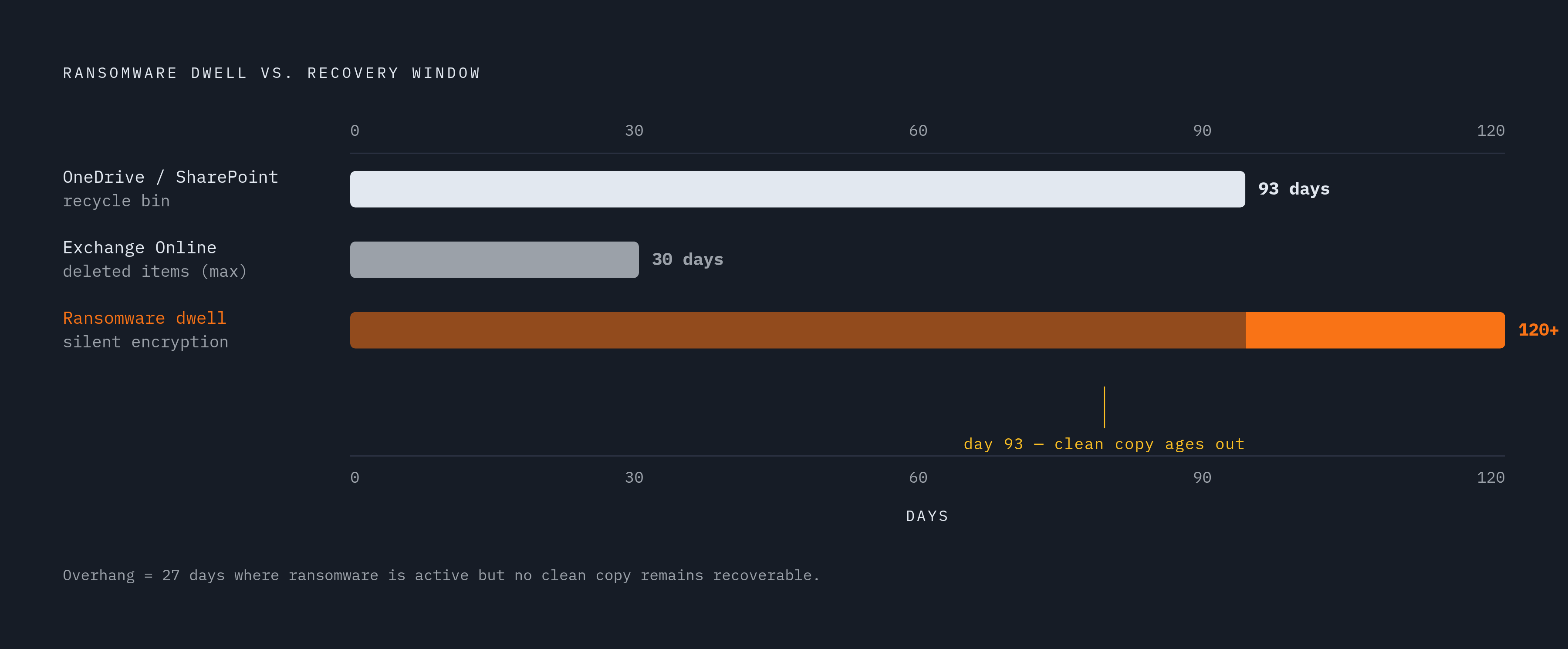
The actual numbers are worth sitting with. OneDrive and SharePoint give a combined 93 days of recovery across both recycle bin stages. Exchange Online defaults to 14 days for deleted items, extendable to 30 with configuration. Ninety-three days sounds like a decent cushion, until slow-burn ransomware enters the picture: variants that encrypt data silently over 120 days or more, so that by the time anyone notices, the clean pre-infection copy has already aged out of the recovery window. The backup you needed expired before you knew you needed it.
Same problem, smaller scale: a team that notices a deleted folder 100 days after the fact has no native path back to it. Microsoft does sell an answer here, Microsoft 365 Backup, a paid add-on that stretches retention to a year for supported workloads. That helps, but it doesn't change the underlying geometry. The data still sits inside Microsoft's boundary, still reachable by a compromised admin account, still not a copy that lives somewhere separate. Native tools also aren't built for speed at scale. Restoring a large volume of data through native tools can take considerably longer than most recovery plans assume.
For MSPs, the practical risk isn't the 93-day window itself. It's calling that window "backup" in a client conversation. It sounds like coverage right up until a real incident tests it, and by then, the conversation has changed from "what's included" to "why wasn't this backed up."
Teams data and lesser-known workloads left outside backup scope
Teams has quietly become the place where decisions actually get made and recorded, chat threads standing in for what used to be email chains or meeting notes. Yet it's one of the most consistently overlooked pieces of M365 data protection. Microsoft Purview can extend retention to Teams 1:1 chats, but retention isn't the same thing as backup, and it doesn't guarantee point-in-time recovery. That distinction matters more than it sounds like it should, because those chat threads often end up as evidence in audits, internal investigations, or legal proceedings.
Vendor claims add another layer of confusion. Some backup products advertise Teams support but only protect channel content, leaving 1:1 chats out, or they require extra configuration that often goes uncompleted. Worth asking a vendor directly what "Teams backup" covers before assuming it means everything. Planner, Forms, and Entra ID configuration sit outside scope for a lot of backup products too, treated as afterthoughts rather than core workloads. Synology's MSP-focused analysis flags three features that keep getting missed: Teams 1:1 chat backup, WORM immutability, and air-gap protection.
Infrascale's data shows 76% of U.S. MSPs now focus on backing up cloud applications for clients, which sounds like the problem is solved. It isn't, not quite. Adoption of cloud app backup and completeness of that backup are different measurements, and a lot of MSPs are strong on the first while shaky on the second.
Entra ID: the identity layer that makes every other backup useless if it fails
Entra ID handles authentication, authorization, user and group access, device access, application permissions, admin roles, and Conditional Access policies across the whole tenant. It's the switchboard. Ask what happens during a full recovery if mailboxes and OneDrive data are perfectly backed up but the Entra users needed to access them aren't there anymore. The answer isn't complicated: the data has nowhere to go. No accounts, no access, no recovery.
That's the pattern that shows up again and again in full recovery exercises. Exchange gets covered. SharePoint gets covered. OneDrive gets covered. Entra ID gets treated as someone else's problem and left out entirely.
Attackers have clearly noticed the same blind spot MSPs keep missing. Identity-based attacks rose 32% in the first half of 2025, and the strategy is consistent: compromise Entra ID first, strip out protections, then encrypt the data at leisure. Microsoft analyzes 38 million identity-risk detections on an average day, which gives some sense of scale for how contested this layer already is. Microsoft released a preview of its own Entra ID Backup and Recovery feature in March 2026, useful for a single tenant trying to protect itself, but it wasn't built for the multi-tenant, multi-customer recovery work MSPs actually run day to day. Most organizations using Entra ID still have no backup of it at all. That's not a checkbox someone forgot. It's an architectural hole, and it connects straight into the next problem: an attacker who owns the identity layer owns production, and if backup shares that same credential boundary, owns the recovery points too.
How ransomware now targets M365 environments, and why native recovery falls short
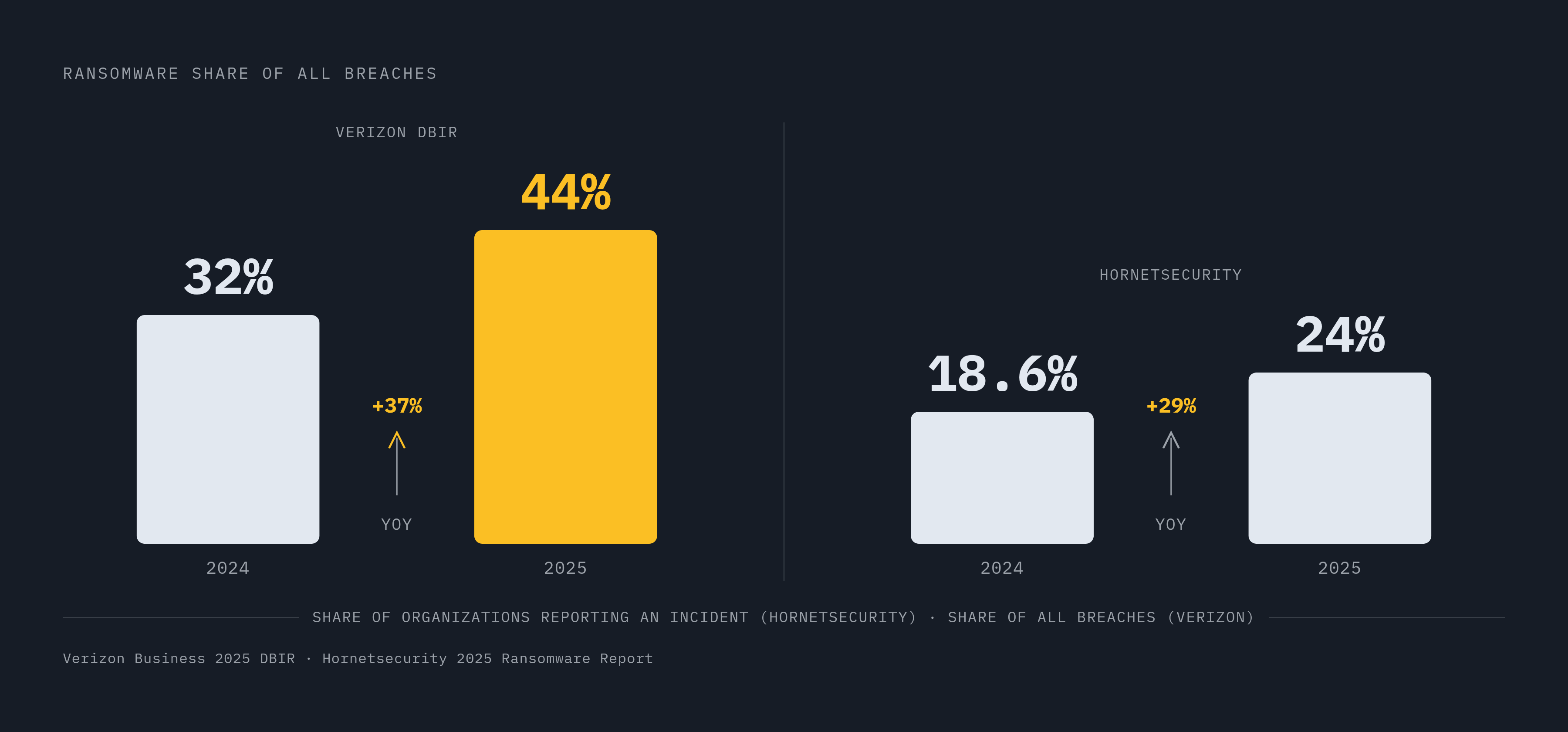
Ransomware showed up in 44% of all breaches reviewed in Verizon Business's 2025 Data Breach Investigations Report, up from 32% the year before, a 37% jump year over year. Hornetsecurity's 2025 Ransomware Impact Report puts the share of organizations reporting a ransomware incident at 24%, up from 18.6% in 2024. These aren't small moves.
SaaS ransomware doesn't need malware in the traditional sense. It signs into the tenant with a stolen password and then acts exactly like a legitimate user, which means there's no malware signature for anything to catch. In July 2025, multiple threat actors, Storm-2603 among them, exploited SharePoint vulnerabilities through what's been called the ToolShell exploit, and between them compromised more than 400 organizations. That's not a hypothetical risk model, that's a dated, named event.
Backup destruction is now standard procedure, not an edge case. Sophos's 2024 survey found 94% of ransomware victims saw attackers attempt to compromise backups specifically, and 57% of those attempts worked. Only 14% of IT leaders say they could recover critical SaaS data within minutes of an incident. Downtime can run past $300,000 an hour, and IBM's 2025 Cost of a Data Breach Report puts the global average breach cost at $4.44 million. Native retention and Microsoft 365 Backup both sit inside the same administrative boundary as production. A compromised admin account can walk into recovery points just as easily as it walks into live data, which sets up the section that follows almost exactly.
Backup copies that an attacker, or an admin mistake, can still reach
A real backup is logically separated from production. That's the whole principle, stated plainly: if the same credentials that access production also access the backup, the backup isn't a second copy, it's a second target with the same lock on the door.
Retention policies, Preservation Hold, native restore points, all of it sits inside Microsoft's own service boundary. Fast to restore from, sure, but production and recovery share the same fate the moment there's an outage or an admin account gets compromised. Immutability is the fix, and it's a specific, technical guarantee, not a marketing phrase: once data is written, nobody, not an admin, not an attacker with valid credentials, can alter or delete it until the retention period runs out. Without an automated retention lock behind that promise, though, backups can get unlocked early, and the whole point of immutability quietly disappears.
Air-gapping adds the last piece. Even if credentials get fully compromised, a copy that's physically or logically isolated stays out of reach. Syncro's 2025 data found that 28% of MSPs only review or update security baselines after an incident happens, which says a lot about how reactive the posture still is across the industry. The checklist here isn't complicated: confirm the backup solution has WORM immutability built in, confirm the retention lock is automated rather than optional, and confirm the storage layer sits outside Microsoft's own administrative boundary.
Human error patterns that native tools handle poorly at MSP scale
People cause a lot of this on their own, no attacker required. Industry data attributes 43% of data loss incidents to employees, and half of those are simple accidents: selecting the wrong batch of files, emptying a recycle bin that shouldn't have been touched, overwriting a document that someone else needed.
Employee departures make the problem worse by spreading it out. Data belonging to one departing employee sits scattered across Exchange, OneDrive, SharePoint, and Teams, and recovering it means going into each service separately, each with its own strict retention clock running on its own separate schedule. Multiply that by dozens of client tenants, which is the actual daily reality for an MSP, and the manual per-service recovery process stops being merely annoying and starts being operationally unworkable. Syncro's 2025 data shows technicians already lose 18% of their time to managing user access and credential issues, before any of this recovery work even starts.
Point-in-time restore from an actual backup sidesteps the whole race against retention clocks. This is where native retention and real backup stop being an abstract distinction and start being something an MSP can put a dollar figure on for a client.
Compliance exposure that incomplete backup creates for MSP clients
HIPAA, GDPR, SOC 2, financial services rules: native M365 retention typically fails all of them on the same three points, point-in-time recovery, immutability, and long-term retention. Industry data shows broad adoption of cloud backup among MSPs, but compliance with standards like HIPAA, GDPR, and SOC 2 lags well behind that coverage. Coverage is widespread. Compliance is not, and that gap between the two is the whole story in miniature.
Regulatory compliance with standards like HIPAA requires configuration work well beyond what M365 provides by default, and many clients and MSPs have not completed it. The European Data Protection Supervisor found the European Commission itself in infringement of EU data protection rules over its use of Microsoft 365, in a decision dated March 8, 2024, and ordered corrective measures. If the European Commission can get this wrong, regulatory exposure here isn't some abstract worry for smaller shops to wave off.
Demand is shifting in response. A survey from MSP Success found 73% of MSPs reporting a rise in client demand for compliance services, which makes data residency and compliance readiness a selling point now, not just a risk to manage quietly in the background. Backup data location plays into this directly, since data residency requirements vary by jurisdiction and not every backup solution is positioned to meet them.
What a complete M365 backup strategy actually covers
Put the pieces together and a complete strategy has six layers, each answering a gap named above. Coverage starts with Exchange, OneDrive, and SharePoint as the baseline, then extends to Teams 1:1 chats and channel content, Planner and Entra ID, so nothing important is quietly sitting outside scope. Protection means WORM immutability with automated retention locking, plus air-gap storage that sits outside Microsoft's administrative boundary entirely, so a copy survives even a fully compromised admin account.
Recovery means point-in-time restore that doesn't race against Microsoft's own retention clocks, paired with restore testing that checks the data actually works, not just that the restore job finished. NovaBACKUP's 2026 MSP analysis notes that insurers are increasingly asking for documented proof of restoration testing, not a checklist claiming it happened. Identity has to be part of the plan too: Entra ID backed up alongside the data itself, so a restored mailbox has an account and a permission structure ready to receive it instead of landing in empty space.
Operationally, fragmented tools are exactly what's driving the 40% of MSPs who cite complexity as their top M365 management challenge, so a single unified platform for multi-tenant management cuts configuration drift and shortens onboarding. Compliance means control over where backup data physically lives, matched against GDPR, HIPAA, and whatever sovereignty rules apply to a given client, with retention periods documented against those same frameworks rather than left to guesswork. And posture matters as much as any of the technical layers: with 28% of MSPs still only updating security baselines after something's already gone wrong, per Syncro's 2025 numbers, a complete strategy runs baseline checks and backup validation on an ongoing basis, not as a reaction to the last incident. MSPs who keep their own service documentation and client-facing security materials in house, rather than farming them out, can update that material at the same pace the threats themselves keep changing, which turns out to be the difference between a backup plan on paper and one that actually holds up.
Sources
- Inside the messy reality of Microsoft 365 management - Help Net Security
- 9 Top Data Backup Questions from MSPs Answered (2026 Edition)
- Syncro Survey: Nearly 30% of MSPs Report Preventable Microsoft 365 Data Loss Due to Backup Gaps
- Time for MSPs to rethink Microsoft 365 backup to protect better and earn smarter - Synology Blog
- acronis.com
- veeam.com
- cybersentriq.com
- arcserve.com