On-Premises vs Cloud Backup for SMB Clients
Hybrid backup strategies outperform either cloud or on-premises alone.
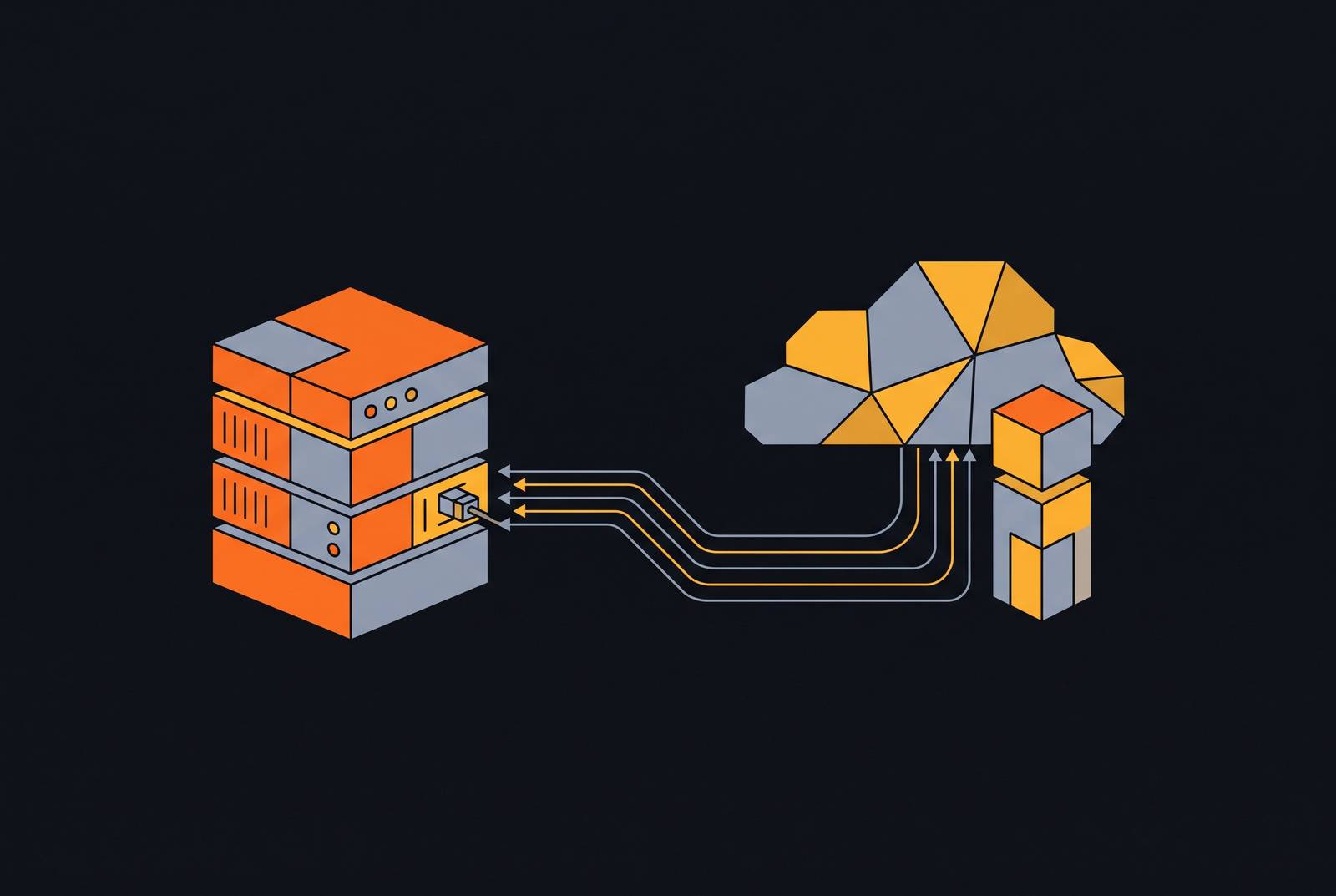
The SMB backup decision usually gets framed as a shopping question: cloud or on-prem, pick one. That framing is wrong, and it's wrong in a specific way. Backup isn't a vendor selection problem, it's a resilience architecture problem, one that plays out across three separate dimensions: cost over time, recovery speed under real conditions, and whether the data survives when the primary site gets compromised. No single approach wins all three at once. On-prem alone fails the basic offsite test that ransomware has made non-negotiable, and cloud alone can turn a routine server restore into a slow, painful ordeal over a business internet connection, with potential egress costs waiting at the end of it. That tension, not a preference for one vendor over another, is the actual decision SMBs are making, whether they realize it or not.
How the SMB backup market has shifted, and what it signals about where the risk actually sits
Commercial data backup software is projected to grow from $13.2 billion in 2025 to $21.1 billion by 2034, a 7% compound annual growth rate. The cloud-backup slice of that market is worth roughly $7 to $8 billion in 2025 on its own, growing at 20% to 26% annually through 2030. Those numbers alone would suggest a straightforward story: cloud is winning, on-prem is dying, case closed.
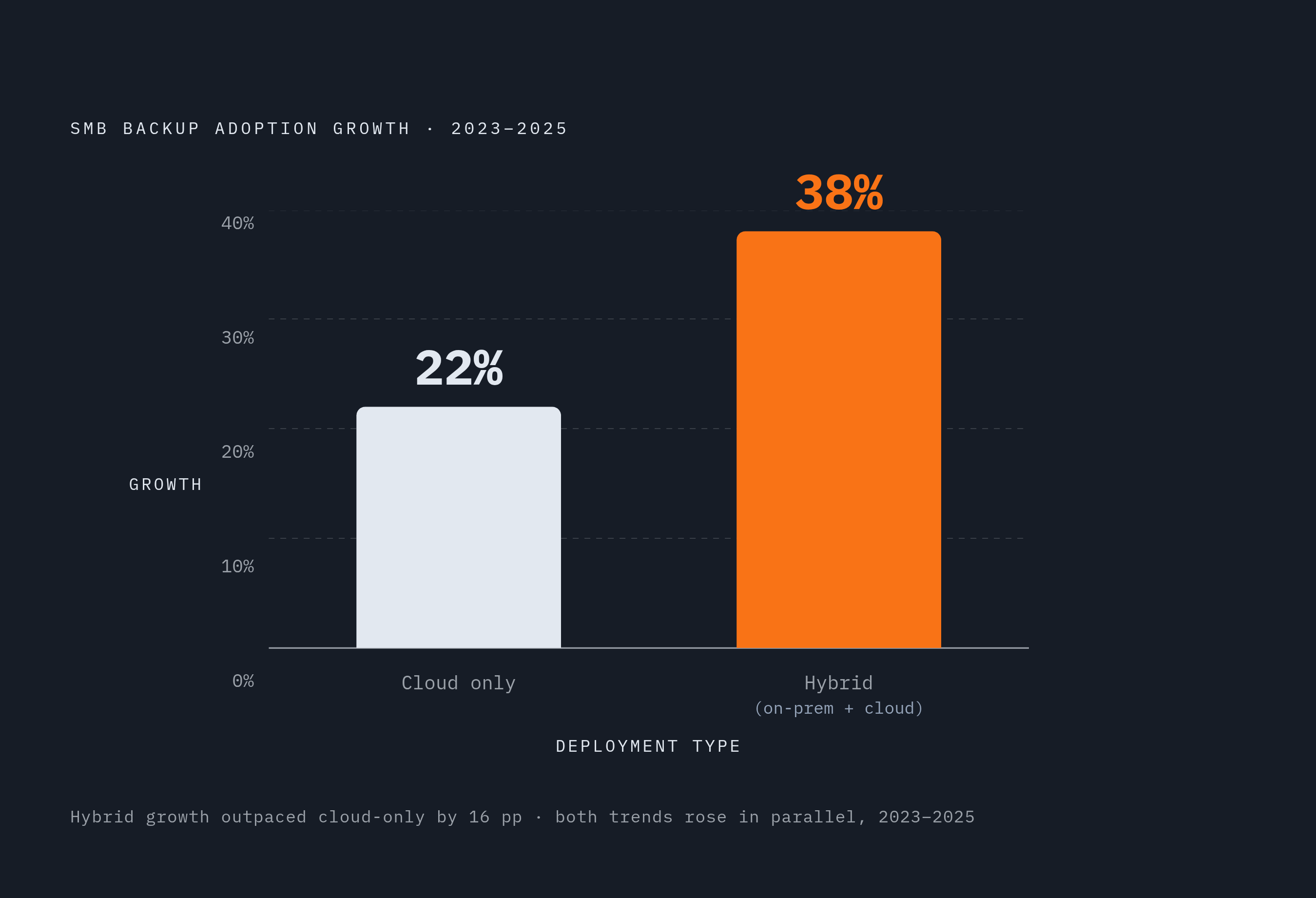
Except that's not what the SMB-specific data shows. Over 52% of new backup software deployments are cloud-based, and SMB uptake of cloud backup grew 22% between 2023 and 2025, with 63% of SMB workloads and 62% of SMB data already cloud-hosted as of 2024. But hybrid deployments, meaning on-prem plus cloud together, rose 38% in that same window. Cloud didn't replace on-prem. It got added on top of it.
That's the tell. If SMBs were simply migrating away from local infrastructure, hybrid adoption would be flat or declining while pure-cloud numbers climbed. Instead both numbers are climbing together, which means the market has independently arrived at the same conclusion the 3-2-1 rule states outright: you need both tiers, not one or the other. Backup-as-a-Service, or BaaS, is what's made this affordable for SMBs without a dedicated IT department, since it packages the cloud tier as a subscription rather than a capital project. The market data here isn't a trend to chase. It's evidence that real businesses, working through the same cost and risk trade-offs this piece maps out, keep landing in the same place.
The real cost structure of on-premises backup over five years
Setting up an on-prem backup solution for 10 terabytes of data runs $23,000 to $61,000 upfront, according to a 2025 cost analysis, plus $16,000 to $32,000 a year in ongoing maintenance. That's a wide range, and the width matters: it's driven by hardware tier, whether the SMB needs a UPS and dedicated rack space, software licensing terms, and whether there's already IT staff on hand or coverage has to be hired or contracted in.
Hardware doesn't last forever, either. Server and storage refresh cycles run 3 to 5 years on average, which means that capital outlay isn't a one-time event, it's a recurring one. Any five-year cost model that doesn't budget for a second hardware generation is quietly lying to you.
Then there's the labor question, which is where most vendor quotes go conspicuously silent. A typical on-prem environment at a twenty-person SMB requires 15 to 25 hours of skilled IT labor every week: hardware checks, backup verification, patching, emergency response when a drive fails at 2 a.m. on a Saturday. Add electricity, cooling, physical security, antivirus licensing, and whatever closet got converted into a server room, and the annual run rate climbs well past the maintenance line item alone.
None of this means on-prem is a bad deal, categorically. Cloud tends to win on total cost for smaller shops, but the math can flip going the other direction. At larger headcounts and data volumes, organizations with established IT teams and existing infrastructure often find on-prem the cheaper long-run option, because the fixed costs of staff and facilities are already sunk. The honest move is to model both scenarios against actual headcount and data volume rather than assuming either one is "cheaper" by default. Cost is only one leg of the stool, though. Even a business that can comfortably afford on-prem still has to answer a separate question that no cost model touches: how fast can it actually get the data back?
The cloud backup cost structure and where the savings actually come from
Cloud backup for that same 10 terabytes costs about $3,000 upfront and roughly $3,600 a year, an 80% reduction in ongoing operating cost compared to the on-prem maintenance figure. Small SMBs, the 5-to-50-employee range with no dedicated IT staff, typically pay $50 to $300 a month for a subscription that scales in minutes and comes with built-in disaster recovery spread across multiple data centers.
Where does that savings actually come from? No hardware depreciation, no facility overhead, no headcount dedicated to babysitting infrastructure, no replacement cycle every few years. The provider eats those costs in exchange for the recurring subscription fee, and pay-as-you-go pricing means an SMB with growing or unpredictable data volume isn't stuck estimating capacity two years out.
But the savings don't hold in every direction. Egress fees, the charge for downloading data back out of cloud storage, can turn a full multi-terabyte restore into an invoice nobody budgeted for. Restore speed is capped by the SMB's own internet connection, a constraint that gets genuinely painful at scale (more on that in the next section). And migrating away from a provider with proprietary data formats or APIs can be slow and expensive, the textbook definition of vendor lock-in.
There's a shared-responsibility trap here worth naming directly. Gartner figures cited in industry analysis put the share of cloud security failures that are customer-driven, mostly from misconfiguration, at 99%. The provider secures the infrastructure. Identity management, storage permissions, and access controls stay the customer's job, and skipping that homework is how "we have cloud backup" turns into "we had cloud backup."
Which raises the misconception that trips up more SMBs than anything else in this piece: cloud sync is not backup. File-sync tools mirror your files, they don't protect them. If ransomware encrypts the primary copy, sync dutifully propagates that encryption straight to the cloud copy, and the "backup" restores to the same locked mess. Cost comparison resolved. Now for the harder question: what actually happens when an SMB needs to restore, not in theory, but at 3 a.m. with a ransom note on every desktop.
Recovery speed and the RTO/RPO reality most SMBs don't test until it's too late
Two acronyms do a lot of work in this conversation, and both are business decisions dressed up as technical ones. RTO, Recovery Time Objective, is how long the business can survive without its systems, the maximum tolerable downtime before real damage sets in. RPO, Recovery Point Objective, is how much data loss, measured in time, the business can live with. Neither is an IT department's call to make alone; both should be set by whoever owns the risk of the business going dark.
On-prem wins the RTO race decisively for large datasets. Local backup restores over the LAN at full local network speed, no internet bottleneck, no waiting on a provider's servers three states away. For anything data-heavy, video production, medical imaging, large transactional databases, that local speed advantage isn't marginal, it's the difference between a bad afternoon and a lost week. Restoring large datasets over typical business broadband can be dramatically slower than the same restore over LAN, a gap that compounds quickly at scale.
Cloud flips the script on RPO. Continuous or near-continuous cloud backup can put the last usable recovery point minutes or hours before an incident, while scheduled on-prem snapshot systems often default to a 24-hour RPO unless someone's gone in and configured it tighter.
Here's the number that should worry anyone who assumes their backups just work: only 14% of IT leaders feel confident they could recover critical SaaS data within minutes of an incident, according to the 2025 State of SaaS Backup and Recovery Report. That's not a technology gap so much as a testing gap. A backup job that completes successfully every night for two years tells you nothing about whether the restore actually works, and the SMBs that find out the hard way are the ones who never ran a real drill against real data. Regulated environments don't get to treat this as optional, either: HIPAA and SOC 2 frameworks specify RTO and RPO thresholds directly, meaning "best effort" isn't a compliant answer if a business handles protected health data or is trying to pass a SOC 2 audit.
Recovery speed makes the case for keeping a copy close to home. But speed isn't the only threat model here, and it's arguably not even the scariest one.
Why ransomware has made the offsite copy the most important part of any SMB backup strategy
Nearly 1 in 4 SMBs experienced a ransomware incident in 2025. Of breaches hitting small and mid-sized businesses, 88% involved ransomware, compared with 39% at large enterprises, and more than two-thirds of all ransomware incidents landed on organizations with fewer than 500 employees. Ransomware operators, it turns out, have figured out that SMBs are softer targets with less mature defenses, which is not exactly a plot twist.
Here's the detail that changes the whole calculus: 96% of ransomware attacks specifically target backup locations. An attacker who's already inside the network with domain-admin credentials doesn't stop at the production servers, they go looking for the backup repository next, because destroying the recovery option is what forces the ransom payment. A backup sitting on the same LAN, reachable with the same login, isn't a safety net. It's just a second target with a bigger data set.
The financial stakes back this up. Setting aside the ransom itself, average ransomware recovery cost runs $1.53 million, a figure that makes the cost gap between backup approaches look almost quaint by comparison.
Genuine offsite protection means physical or logical separation, not just a different folder path. Immutability, meaning object-lock or write-once storage that can't be altered or deleted even by someone with valid admin credentials, is the one tier that survives a fully compromised network. Adoption of immutable backup rose 30% between 2023 and 2025, a direct reaction to backup-targeting ransomware becoming the norm rather than the exception. For an SMB that can't afford a second physical site, cloud storage with object lock functions as a practical air gap: offsite, in a separate authentication domain, immutable at the storage layer. Cost, recovery speed, and resilience are the three legs of this stool, and none of them stand alone. The hybrid model is where they finally get reconciled.
How the 3-2-1 rule translates into a working hybrid architecture for SMBs
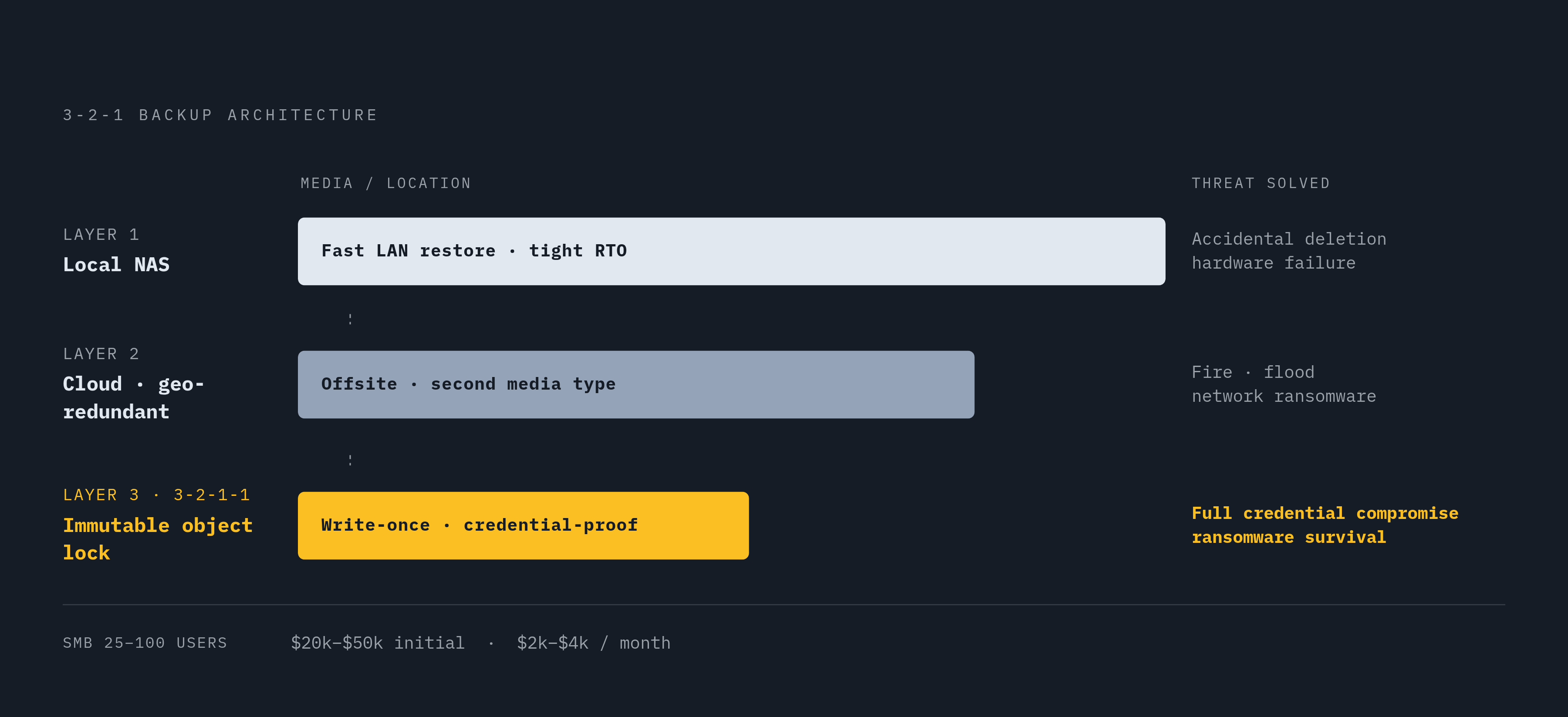
The 3-2-1 rule is old, plain, and does most of the architectural thinking for you: three copies of data, on two different media types, with one of those copies stored offsite. It's not a vendor's marketing pitch, it's closer to a structural constraint. Follow the logic and pure on-prem falls out of contention immediately, because "one copy offsite" cannot be satisfied by a single site, full stop.
Roughly 33% of enterprise deployments were running a hybrid model by the end of 2024, and 90% of organizations are projected to have embraced hybrid cloud in some form by 2027. The local tier in that setup handles the everyday stuff: fast LAN-speed restores, tight RTOs, recovery that doesn't depend on whether the office internet is having a good day. The cloud tier is there for the scenario the local tier can't survive, a fire, a flood, ransomware sweeping the entire local network, with geo-redundancy across multiple data centers built in by default.
Nobody has to stitch these two tiers together by hand. Tools like Veeam Backup & Replication, Acronis Cyber Protect, and AWS Storage Gateway are designed to coordinate local and cloud backup tiers together. Some SMBs push the model a step further into what's sometimes called 3-2-1-1, adding a fourth copy in immutable object storage as insurance against exactly the credential-compromise scenario the ransomware section walked through. Any SMB where a failed recovery would be an existential event should treat that fourth copy as the baseline, not the upgrade.
Budget-wise, a managed hybrid setup for a 25-to-100-user SMB with no regulated data runs $20,000 to $50,000 in initial implementation and $2,000 to $4,000 a month for ongoing managed backup and recovery. Regulated environments, HIPAA or similar, typically run 1.5 to 2 times those figures, which tracks given the added logging, audit, and access-control requirements.
There's a broader industry signal worth mentioning here, if only because it looks contradictory at first glance: 86% of CIOs surveyed in a Q4 2024 Barclays CIO Survey said they planned to move some workloads from public cloud back to private or on-prem infrastructure. Read quickly, that sounds like a retreat from cloud. Read carefully, it's the opposite, it's rebalancing, which is precisely what the hybrid model predicts rather than what it contradicts.
Sizing this by business type: a small SMB with 5 to 20 employees and a modest data footprint fits a cloud-heavy hybrid, local NAS for fast restores, cloud subscription handling the rest, with cloud storage costs in roughly the $50-to-$300-a-month range. A mid-size SMB, 20 to 100 employees with regulated data and larger volumes, needs a more balanced setup, a dedicated local backup appliance paired with an immutable cloud tier, and probably a managed service layer given how heavy the labor burden gets. A data-intensive SMB, multi-terabyte video or imaging workloads, should lean on-prem-heavy, since local restore speed there isn't negotiable, and let cloud serve strictly as the disaster-recovery tier rather than the primary one.
What data belongs on-premises and what belongs in the cloud within a hybrid setup
Not all data carries the same weight, and SMBs increasingly seem to know it instinctively even before regulation forces the issue. In the 2025 State of SaaS Backup and Recovery Report, 42% of surveyed IT professionals said PII and PHI should stay on-premises by strong preference, 42% said the same for corporate financial data, and 40% said the same for sensitive intellectual property.
Regulation is doing a lot of that steering. HIPAA, SOC 2, and GDPR all impose requirements around access logging and breach notification timelines, and GDPR adds data residency rules on top, restrictions on where in the world personal data of EU residents is physically allowed to sit. For an SMB juggling those obligations, keeping the most sensitive categories of data on a server it physically controls isn't caution for its own sake, it's often the more defensible answer under audit. The less sensitive, higher-volume operational data, the stuff that needs geo-redundancy and fast provider-side scaling more than it needs a locked door, is exactly where the cloud tier earns its subscription fee.
Sources
- 2025 State of SaaS Backup and Recovery Report
- Cloud vs On-Prem Backup: Balance Cost & Resilience
- Data Protection And Backup Predictions For 2025 and beyond - Blog | GitProtect.io
- SMB cloud adoption trends and impact in 2025
- Cloud vs On-Premise: The 2026 SMB Decision Guide
- datastackhub.com
- infrascale.com
- Data Backup and Recovery Software Market Size & Share Analysis with Growth Trends | CAGR 10.2%